

KIZAMU
刻む to carve rhythm
Turn a bar into a sequence of cuts, reverses, freezes, and grain. Paint the pattern. Let the track move through it.
Break the grid.
Keep the groove.
Kizamu is a step sequencer for effects, designed to sit on an audio track. Each step can pass clean audio or trigger a distinct transformation. Connected steps become a single phrase, so gestures feel intentional instead of chopped into unrelated hits.
Stutter
Repeat a phrase in time with the host.
↗Reverse
Pull the preceding phrase backwards.
↗Tape Stop
Drop into a slowing tape gesture.
↗Grain
Reshape pitch and texture in short grains.
↗Crush
Reduce detail into hard digital edges.
↗Time Warp
Bend phrase speed toward a near hold.
↗Plus Gate, Drill Roll, Octave Flip, Metal Freeze, Rev Swell, Blowout, and Stereo Chop.
From one hit
to sixteen bars.
Build a loop from 1, 2, 4, 8, or 16 bars. Select a bar to edit its 16 steps, then paint an effect across the cells. The playhead follows your DAW transport.
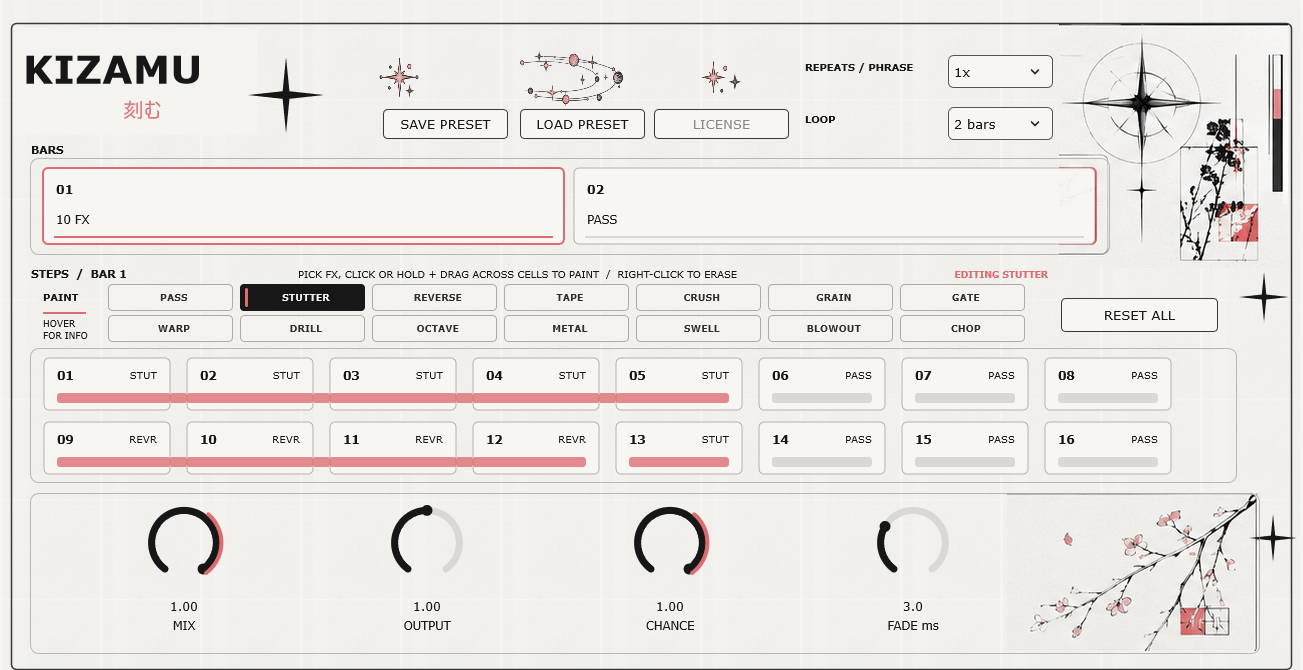
Choose a sound
Pick an effect in the palette. Each effect keeps its own settings.
Paint a phrase
Click a step, or drag across adjacent steps to shape a longer gesture.
Play in sync
Start your DAW transport and hear the sequence follow the bar.
Make the cut.
One Windows x64 VST3 effect. Preset save and load. Project recall for the full sequence and controls.
- Hosted checkout and secure payment by Lemon Squeezy
- VST3 package and license key delivered after purchase
- Activate in the plugin; deactivate when moving computers